Warudo Ultra-Quality Screenshot / 와루도 울트라 퀄리티 스크린샷 / 싸인 자동 추가
- ダウンロード商品Warudo Ultra-Quality Screenshot / 와루도 울트라 퀄리티 스크린샷¥ 2,000
- ダウンロード商品Warudo Ultra-Quality Screenshot / 와루도 울트라 퀄리티 스크린샷 [Donate]¥ 2,500
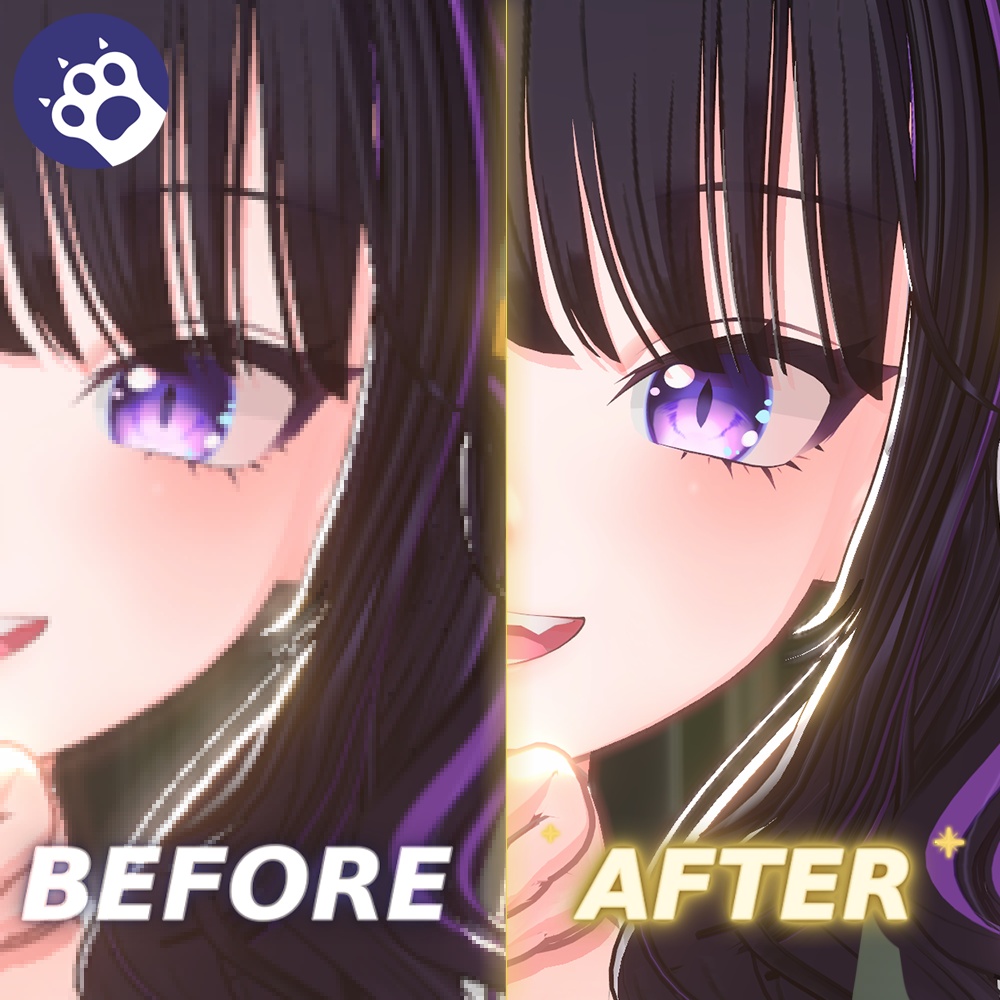
Warudo에서 고품질 스크린샷을 저장하기 위한 커스텀 스크린샷 플러그인입니다. 기본 스크린샷에서 누락될 수 있는 포스트 프로세싱과 NiloToon 화면 효과를 포함하며 LOD와 슈퍼샘플링을 통해 현재 Warudo 카메라의 최종 렌더 결과를 보다 선명하게 캡처합니다. ⚡⚡ NEW 기능 워터마크 기능을 통해 사용자의 마크 혹은 싸인을 스크린샷과 동시에 적용 가능합니다. A custom screenshot plugin for saving high-quality screenshots in Warudo. It captures post-processing and NiloToon screen effects that may be missing from the default screenshot feature, and produces a sharper final render from the current Warudo camera through LOD and supersampling. It also includes a watermark feature, allowing users to apply their own mark or signature at the same time as the screenshot is saved. Warudoで高品質なスクリーンショットを保存するためのカスタムスクリーンショットプラグインです。 標準のスクリーンショット機能では反映されない場合があるポストプロセスやNiloToonの画面効果を含め、LODとスーパーサンプリングによって、現在のWarudoカメラの最終レンダリング結果をより鮮明にキャプチャします。 また、ウォーターマーク機能により、ユーザー自身のマークやサインをスクリーンショット保存時に同時に適用できます。 설치 및 사용 방법은 파일에 동봉되어 있습니다. Installation and usage instructions are included in the file. インストール方法と使用方法はファイルに同梱されています。 - 다운로드 상품의 특성상 구매 후 환불은 불가합니다. - 본 상품은 1인 1구매를 원칙으로 합니다. - 기업 및 법인 사용의 경우 별도로 문의해 주세요. - 무단 배포, 공유, 복제, 재판매를 금지합니다. 위반 시 법적 책임이 발생할 수 있습니다. - 오류 제보 및 문의는 BOOTH 문의 기능을 통해 연락해 주세요. - Due to the nature of digital download products, refunds are not available after purchase. - This product is intended for one purchase per user. - For corporate or organizational use, please contact us separately. - Unauthorized distribution, sharing, copying, or resale is prohibited. Violations may result in legal responsibility. - For bug reports or inquiries, please contact us through the BOOTH message function. - ダウンロード商品の性質上、購入後の返金はできません。 - 本商品は1名につき1購入を原則とします。 - 企業・法人での利用については、別途お問い合わせください。 - 無断配布、共有、複製、再販売を禁止します。違反した場合、法的責任が発生する可能性があります。 - 不具合の報告やお問い合わせは、BOOTHのメッセージ機能よりご連絡ください。 **업데이트 내역** **v1.0.03** - 워터마크 각도 조절 기능 추가 - 투명 PNG 프레임 합성 기능 추가 **Update Notes** **v1.0.03** - Added watermark angle adjustment. - Added transparent PNG frame overlay support. **アップデート内容** **v1.0.03** - ウォーターマークの角度調整機能を追加しました。 - 透過PNGフレームの合成機能を追加しました。 본 플러그인은 와루도 내에서 포스트 프로세싱 우회 캡처라는 기획을 가장 먼저 선보인 Studio MYA(@Studio__Mya)의 선행 플러그인에 영감을 받아 제작되었습니다. (https://booth.pm/ko/items/7540730) 멋진 아이디어로 길을 열어주신 선발 주자(Studio MYA) 측에 리스펙트를 전하며, 본 제품은 해당 핵심 아이디어를 바탕으로 소스 코드 복제 없이 Unity/Warudo SDK 표준 명세를 활용해 독립적으로 개발되었습니다. 아울러 본 제품은 고유의 LOD 품질 제어 및 워터마크 등 독자적으로 고안된 차별화된 메커니즘이 탑재된 별개의 창작물입니다. This plugin was inspired by the preceding plugin from Studio MYA (@Studio__Mya), who first introduced the concept of post-processing bypass capture within Warudo. (https://booth.pm/ko/items/7540730) We express our respect to the pioneer, Studio MYA, for paving the way with their wonderful idea. Based on this core concept, this product was independently developed using the standard Unity/Warudo SDK specifications without any source code duplication. Furthermore, this product is a distinct creation equipped with uniquely designed, differentiated mechanisms, including its own LOD quality control and watermark features. 本プラグインは、Warudo内においてポストプロセッシング迂回キャプチャ라는企画を最初に披露したStudio MYA(@Studio__Mya)の先行プラグインにインスピレーションを受けて制作されました。 (https://booth.pm/ko/items/7540730) 素晴らしいアイデアで道を切り開いてくださった先発のStudio MYA様に敬意を表するとともに、本製品は該当する核心アイデアをベースに、ソースコードの複製なしでUnity/Warudo SDKの標準仕様を活用し、独立して開発されました。 なお、本製品は独自のLOD品質管理やウォーターマークなど、独自に考案された差別化されたメカニズムが搭載された別個の創作物です。